
Plan together.
Travel together.
Actually enjoy it.
The trip planner built for groups. Find dates everyone can make, vote on the plan, build the itinerary together and split the costs—native to iPhone and iPad.
 Download on the App Store
Plan every detail.
Collect every memory.
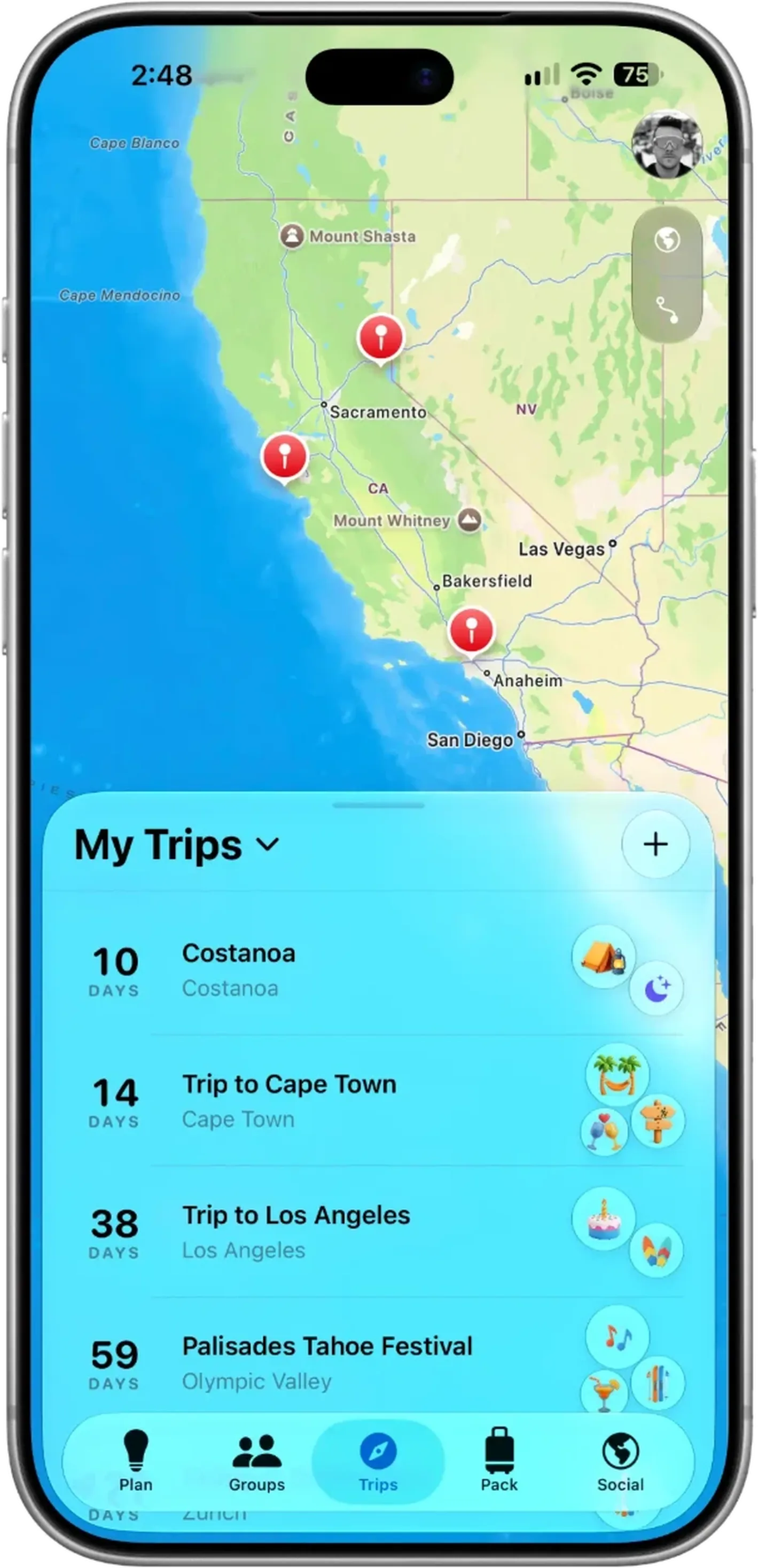
Trip Expenses
Active Poll
Which Rental?






Start with an Idea
Save the TikTok, the Reel or the link from the share sheet, pitch the idea to your group, and see who’s in, maybe or out before anyone commits.
Keep on Planning
Find the dates that work, vote on the stay, hand out tasks and turn the group chat into a day-by-day plan everyone can see.
Get it Booked
Lock in the dates, keep flights, stays and door codes on hand, and split costs in any currency as you go.
Organize everything.
One release.
Smart Bridge AI
Type a trip in one sentence. Read on your phone first.
1.0
Trip Cards
Boarding passes, key cards and door codes.
Calendar
Apple Calendar
Map View
Plot every stop
Vault
Shared gear
Polls
Vote on vibes
Global Expenses
Split costs in any currency.
Offline
Saved on device
Packing
Smart & shared
Availability Sync
Find dates everyone can make.
Start before it's booked.
Most travel apps only care about your trip after you’ve bought the flights. Verve is built for the brainstorm.
- 💡Idea → Planning → Booked: Every trip starts as an Idea on your Ideas Board, moves to Planning as it gains momentum, and becomes Booked once the dates are locked in. Ideas are always free and never count toward a limit.
- 🤝Early Collaboration: Invite friends to shape the plan together before a single dollar is spent. You decide whether everyone can edit the trip, change its look and add people.
- ✅Who’s Booked: Once the trip is on, everyone sees who still needs to book their stay or their way there and back—no more “did you get your flight yet?”
End the "When are you free?" texts.
No more spreadsheets. Everyone fills in My Availability once—free, busy, maybe or working remotely—and shares it with a trip or group in one tap. Verve finds the windows that get the most people there and ranks them on a calendar the whole crew can see.
- 📅Reads Your Calendars: Pick the calendars that count, and Verve marks the days you’re already busy for you.
- ⏱️Your Trip, Your Rules: Choose how many nights and how far ahead to look, or show only dates everyone can make. Verve even suggests a night more or less when that gets more people there.
- 🌤️Season Check: When the trip has a destination, windows in its best season are marked “Great season” and quiet months “Off-season.”
- 👋Nudge & Lock In: Remind whoever hasn’t shared yet, then lock in the winning dates in a tap.
Your whole trip in one place.
Flights, stays, plans and events, organized on one trip page so you can focus on enjoying the journey.
- 🗓️Day by Day: Every plan sits on the destination’s clock with the travel time in between—walk, transit or drive, picked for each leg. Open the map to see each day’s route from where you’re staying.
- 🎟️Trip Cards: Stays are key cards with the door code and Wi-Fi a tap away, flights are boarding passes and rental cars are tickets—right on the trip page for everyone going.
- 🎶Events on Your Dates: Live music, festivals, games and shows near where you’re staying, on the days you’re there—add one and it lands in the plan at its start time.
The ultimate Planning Lobby.
Whether it’s an annual reunion or a trip to Burning Man, Verve Groups are a permanent home for your travel crews. Keep a core circle of Members, choose who joins each trip as a Participant, and share trips with the whole group at every stage, from idea to booked.
The Group Vault
The group’s shared gear in one list: tents, cars, power banks, speakers and kitchen kit, each with who owns it and the details that matter.

Suggest an Idea
Any member can pitch a trip before it exists—a photo, a place, a vibe. Everyone answers In, Maybe or Can’t, and once most of the group is in, Plan This Trip turns it into a real one.

Always in Sync
Share My Availability with the group once and it stays up to date. Find Best Dates shows when the whole crew is free—and who you’re still waiting on.

Plan at the speed of thought.
Verve’s Smart Bridge turns one messy sentence into a real trip. It reads what you typed on your phone first, asks Apple Maps where you mean, and only reaches for cloud AI when nothing else can.
- ⚡Quick Capture: Type “Ski trip to Utah in February with Sam” and Verve fills in the place, dates, length, activities and who’s going—right on your iPhone, free for everyone. On iOS 26, Apple Intelligence on your device helps with the messier ones.
- 🧠AI Itineraries: Ask “Plan me 5 days in Tokyo” for a day-by-day draft, or use Fill with AI to plan a free day—meals at mealtimes, things to do in the gaps, travel time kept clear. Free accounts get 3 drafts and 3 fills a month; Pro is unlimited.
Your schedule in perfect harmony.
Turn on Sync to Calendar and your trips appear in a “Verve Trips” calendar in Apple Calendar—each trip as an all-day event and, if you like, every plan at its time—right alongside your meetings. It works the other way too: My Availability can read busy days from the calendars you choose.
Fair settling, globally.
Log each cost in the currency you paid in, split it equally or by exact amounts, and scan the receipt right on your phone. Everyone can add what they paid, and Verve keeps a running balance of who owes whom across every trip and group—so settling up takes seconds.
Everything else your trip needs.
Packing That Learns
Suggestions from the forecast, your activities and the trip’s length, a heads-up when the weather changes, and lists that learn what you actually pack. Share a list with the people you’re packing with.
Passport & Documents
Your countries, trips and days away on a world map, all time or by year, with a passport page to share. Passports and IDs are scanned on your phone and stay only on it.
Discover
Trip ideas for the month you want to go—ski, beach, city breaks, northern lights—ranked by season and by what people on Verve are planning, each with a sketch of how the days could go.
Widgets
Next Trip, Next Flight, Up Next, Upcoming Trips, Availability, Balances, Packing and more—on your Home Screen and Lock Screen.
Invite in Messages
Send a trip invite as a rich bubble right in iMessage, or share a link—it opens the trip in Verve and shows a preview of it everywhere else.
Save From Anywhere
Share a link from Safari, Maps or any app into Verve and file it in a collection for the trip. Or just say “Create a trip in Verve” to Siri.
Made for iPad
On iPad, My Trips, Plan, Groups, Pack, Social and Discover open up into big-screen layouts—like the map edge to edge with your trips in a card beside it.
No Account Needed
Try Verve as a guest. Everything you make stays on your device, and when you sign up it all moves to your account.
You Choose What Friends See
Share a trip with all friends, close friends, people you pick or your groups. Friends see it once it’s booked, with only the details you allow. How we protect your data
Verve vs. The Others
See why Verve is the new standard for modern travel crews.
| The Planning Engine |
The Pro Choice
Verve
|
Tripsy | TripIt | Flighty |
|---|---|---|---|---|
The Genesis Phase Ideas & Brainstorming stages |
✅ Full Lifecycle | ❌ Booked only | ❌ Confirmation only | ❌ Flight only |
Availability Sync Finding "Best Dates" automatically |
✅ Smart Matching | ❌ Manual | ❌ Manual | ❌ No |
The Group Vault Persistent shared gear & asset tracking |
✅ Persistent | ❌ No | ❌ No | ❌ No |
Expense Core Global splitting & multi-currency |
✅ Any-Currency Splits | ⚠️ Basic Lists | ❌ No | ❌ No |
Smart Bridge AI On-device parsing + cloud AI itineraries |
✅ On-Device First | ❌ No AI | ⚠️ Server-side | ❌ No AI |
Social Lobby Persistent Groups vs. One-off Trips |
✅ Member System | ⚠️ Guests only | ⚠️ Shared view | ⚠️ Friends only |
How the beta works.
Verve 1.0 is in public beta through TestFlight, Apple’s free app for trying apps before they reach the App Store. It takes about two minutes.
-
Join with your email
Enter your email in any Join Beta box on this page. We add you to Verve’s TestFlight beta.
-
Open Apple’s email
Apple emails you an invitation from TestFlight, usually within minutes. Nothing yet? Check your spam folder.
-
Install with TestFlight
On your iPhone or iPad, get the free TestFlight app, then tap View in TestFlight in the email and Install.
Questions
What do I need?
An iPhone or iPad with iOS 18.6 or later. A few touches need iOS 26: the Liquid Glass look, and Quick Capture’s on-device Apple Intelligence reading, which also needs a device that supports Apple Intelligence.
Does it cost anything?
No. TestFlight and the beta are free, and Verve’s free plan covers a typical year of trips. If you try Verve Pro in the beta, Apple treats it as a test purchase and you aren’t charged.
Do I need an account?
Not to start. As a guest, everything you make stays on your device. Sign up when you want to invite friends, join groups or share a trip, and everything you made moves to your account.
Will my trips carry over to the App Store version?
Yes. Trips you make while signed in are saved to your account, so they’re waiting for you in the App Store version.
Do my friends need the beta too?
To plan with you in Verve, yes—send them here to join. Invite links you share show the trip and how to get Verve, then open it in the app.
How do I send feedback?
Take a screenshot in Verve and tap Share Beta Feedback, or open TestFlight, pick Verve and tap Send Beta Feedback. It comes straight to us.
How do updates work?
TestFlight lets you know when a new build is ready and can install it for you automatically. Each beta build works for 90 days, and new ones arrive well before that.